Unique And Advanced Features

Short branded links transform long URLs, giving them flexibility.


Branded Links counter icon01 / 06

Custom Branded Links

Transform long URLs into custom branded links to boost click-through rates and build brand trust.

URL Shortener check icon

URL Shortener

Shorten any long URL into a clean and branded link.

Custom Back-Halves check icon

Custom Back-Halves / Slugs

Create memorable slugs that reflect your brand.

Link Expiration Control check icon

Link Expiration Control

Set link expiration dates to keep your links relevant.

Bulk Creation check icon

Bulk Creation

Create hundreds of branded links in seconds.

Get started for freeArrow pointing up and right

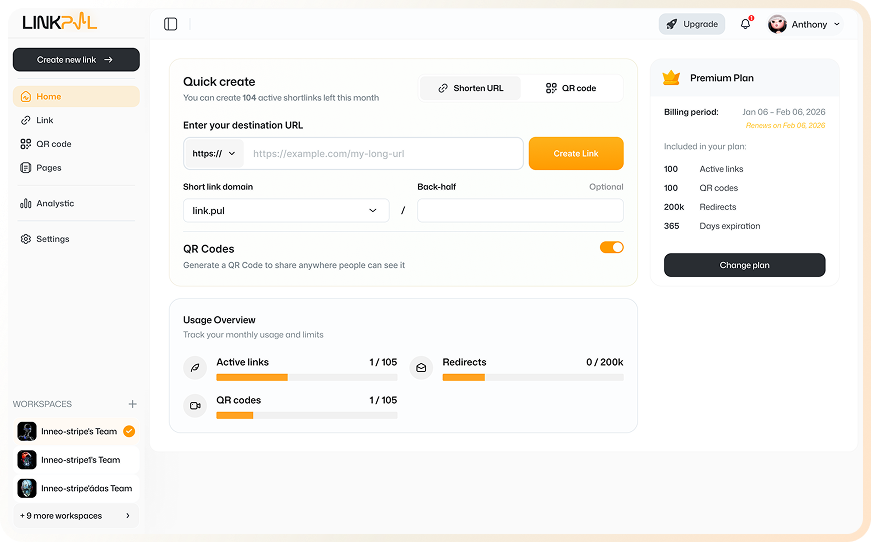
LinkPul branded links dashboard preview

Built for Every Growth-Driven Team

From marketers to enterprise teams, LinkPul empowers creators and businesses to optimize every digital connection.

Digital marketers and campaign managers icon

Digital Marketers & Campaign Managers

Branded Custom Domains feature
Branded Custom Domains
Rule-Based Routing feature
Rule-Based Routing
Automated Campaign Tracking feature
Automated Campaign Tracking
Interactive Real-Time Analytics feature
Interactive Real-Time Analytics

E-commerce and retail brands icon

E-Commerce & Retail Brands

Branded and Custom Design QR Codes feature
Branded & Custom Design QR Codes
Smart Link and Dynamic Routing feature
Smart Link & Dynamic Routing
Flexible Target Link Redirection feature
Flexible Target Link Redirection

Affiliate marketers and content creators icon

Affiliate Marketers & Content Creators

Short Link Creation feature
Short Link Creation
Reactive Link Management feature
Reactive Link Management
Device and Geo Targeting feature
Device & Geo Targeting
Real-Time Click Analytics feature
Real-Time Click Analytics

Enterprise and marketing agencies icon

Enterprise & Marketing Agencies

Team Workspaces and Roles feature
Team Workspaces & Roles
Bulk Link Import feature
Bulk Link Import
Seamless API Integration feature
Seamless API Integration
White-label Reports feature
White-label Reports

Frequently Asked Questions

Clear answers to help you manage and scale your traffic with confidence.


Can I change the destination URL after creating a short link?


Yes. With our dynamic redirect feature, you can update the target URL anytime in your dashboard without changing the short link.

How do Rule Links work for geo-location and device targeting?


Rule Links let you automatically route visitors to different destination URLs based on factors such as their geographic location or device type. This helps you deliver more relevant experiences using a single short link.

Will my short links or QR codes expire if I cancel my subscription?


Your existing short links and QR codes may remain accessible depending on your account status and plan settings. Some premium features, analytics, or management options may become unavailable after your subscription ends.

Can I use my own domain name for short links?


Yes. LinkPul supports custom domains, allowing you to create branded short links using your own domain name for a more professional and recognizable experience.

How does LinkPul distinguish between Total Clicks and Unique Clicks?


Total Clicks counts every click made on your link, including repeated clicks from the same visitor. Unique Clicks estimates the number of distinct visitors who clicked the link during the selected reporting period.

What real-time analytics can I track with LinkPul?


LinkPul can help you monitor link performance with analytics such as total clicks, unique clicks, devices, browsers, geographic locations, referrers, timestamps, and campaign performance.